Hi everyone!
I am continually inspired by the awesome studio projects that you are doing. I am a guild leader of a large World of Warcraft group. We have a particularly large female gamer base, and this last weekend, we decided to have a virtual girls night. We talked about the project and decided that I should focus baking. But, it gets better! My friend Joan (Waterlilies, H-Malganis) turned me to the website Bake It in a Cake. This site is hilarious! Basically, you take things and bake them into other things, such as Cadbury Eggs in Brownies or Peanut Butter cups in a cupcake! How fun!!
Thursday, March 31, 2011


Wednesday, March 30, 2011
My timeline
Since everyone is sharing their concept maps, I wanted to share something of mine and get some feedback if you have time. We created a timeline for Constructionism. If you think I should add anything to it, or if the layout does not speak to you, please let me know!
Monday, March 28, 2011
Maria's concept map on Media Arts
"The field of media arts presents many unique opportunities for educators and researchers wanting to encourage active learning, make the schooling curriculum relevant to youths’ out-of-school interests, and teach youth how to communicate through a variety of multimodal discourses" (Peppler, 2010, pp. 29-30).This week I worked on making my concept map even more complex. A new layer of connections contributes with information on creating with media arts and tools in order to give answers to the question "what is the role of arts, computation and digital creativity in new media"? I focus on Peppler's work on media arts, on Reas's tools and on Dewey's ideas, as well as on Sefton Green's creativity ideas. I also draw from my own experiences with my studio projects so far.

You can view an enlarged picture of the concept map HERE.
The role of the arts, computation and digital creativity is important for new media. Peppler's paper showed that impact at the Computer Clubhouse in Los Angeles. As an example, that study highlights the importance that freedom in creativity can have in the ways new media are explored, used and also in the ways they convey messages. It seems that this freedom allows experimentation and exploration within the areas of new media, and people learn through alternative ways of using tools. She promotes the ideas around learning in and out of school, and new media being the diode to such creative learning practices. Scratch is a tool that allows for experiential, experimental and active creation and learning.
Dewey was a great advocate of experiential learning and viewed the arts as an experience through which we grow our identities and knowledge. Along those lines, Reas and Peppler both reinforce this argument with their work. Reas proposes new ways of communicating with the computer, related to programming languages and authoring tools. He proposes Processing, an open source software that allow users to create easily.
Our understanding of new media derived through the ways they are used in daily life. We all design with new media, we share our creations and reflect on them. Creativity is key to how designs are reflected, and how they are being taken up by the audience. The Scratch community is a context where designs are evaluated. Designers publish that work and the community views, engages with the design, rates it, etc. This becomes a process of reflection, as members view and understand the elements that a project has that make it such.
For our designs studios, this is another opportunity for exploration, experimentation and active learning. We take the initiative to give flesh and bones to our idea, and then we share it with the community. I personally learned a lot about the role of new media for learning, as well as about the affordances that new media provide for creative expression and learning. For example, atmosphir was one of the tools that make the greatest impression to me. It is dynamic, and powerful tool that allowed me to experiment with an idea I had, develop it and share it. Whether one is a digital native or a digital immigrant, people can use them in the same ways. Literacy in new media becomes significant in such cases of authoring and digital production.
Sunday, March 27, 2011
New Media Literacy_Shively
This week, I decided to try out a new mind mapping tool online (in the spirit of New Media Literacy!) To learn more about this tool, please visit http://www.mindmeister.com - In short, this was a very easy application to learn and it was super fun! It links your terms to the internet to find the 'best' images, if you so please to post an image within your map - plus so much more - oh! and it allows you to share with your team - so they can add links, too! Lots of fun actions.
Anyway, onward and upward to the connections and explanation of my concept map. Then I will address the guiding questions for the past week: “What is the role of arts, computation and digital creativity in new media? What do the readings have to say in this regard? What have your gleaned from your own experiences in the studio thus far? What might you add to the discussions in the literature?"

All of the readings, aside from Dewey's article - concerned New Media Literacy. Although Dewey is far before New Media, he is the "father of experiential learning" - which New Media Literacy's foundation for learning requires. Thus, his work connects to Piaget and Papert's work concerning constructivism and constructionism, since his work posits that creating art and being an artist is fundamentally based on the experiences an individual carries forth when designing, creating, and critiquing such work. As you can see, Dewey's work influences Piaget and Papert as well as Peppler, Reas & Fry, and Resnick. In fact, you can see that all of the scholars are connected in some way throughout their scholarship.
Peppler's Media Arts study is connected to Reas & Fry due to the Processing language in Scratch. Her study is directly a result of Resnick's scholarship and findings, since he is the "father" of the MIT Computer Clubhouse. Her framework for the study is connected to Papert's work and since Papert's work is informed by Piaget's scholarship, her study is also via association with Papert's scholarship.
Peppler's article argues that Media Arts, such as Scratch products, allow for active learning to occur. I did not read the Resnick article this week, but I have read several of Resnick's work in the past. The map I have created reflects how the computer clubhouse is an environment where constructionism and democratic pedagogy can thrive. Thus, the reason for the results Peppler finds in her study regarding Media Arts. Her study supports that programs such as Scratch is clearly an option for curriculum in the realm of art education.
This is a segway to "What is the role of arts, computation, and digital creativity in new media?" First, the arts provide a foundation for understanding how new media is designed, created and how it is critiqued. Secondly, understanding how computation is the language of new media informs users and designers how to work with the new media. Finally, new media requires designers to be digitally creative in order to stand out among the millions of new media products out there. In order to be digitally creative users must have the opportunity to be immersed in the environment to build a foundation for future learning to occur. Programs, like The Computer Clubhouse, fosters this immersion after-school - providing users an environment that promotes both the art and computation skills needed to exercise digital creativity.
Like the Computer Clubhouse, our studio time allows us to explore new media and to be designers, creators, and critics. I have gleaned a new attitude towards new media and its involvement in education. Instead of being worried that new media is ruining our children's young minds, I can rest that it is part of a sub-culture (Digital Natives) that must be nurtured so that our children can be prepared for living in the 21st century. New Media Literacy is a necessary skill for our children (and adults alike). In addition, this genre of literacy increases the "old media" literacy and numeracy skills, thus it is beneficial to practice these skills in and out of school.
Indirect questions and comments: Just some thoughts about the recent research I have been reading - here and through out the semester.
Although urban and low-income areas need environments like computer clubhouses, I hypothesize that the townships and suburbs also need environments like such. I worry that we assume that middle income and upper income families/schools provide enough support when it concerns the digital age; but I wonder what is happening when most households have two working parents or are subject to divorce - with parents not always available to facilitate positive feedback regarding new media. I worry that our children are being left to the care of "the digital age." It seems that the scholarship we are reading only concerns low-income and urban areas. What are the side effects of the digital age in middle and upper income households when there is not feedback, supervision, facilitation, and/or knowledge of what is occurring (in terms of designing, creating, and criticizing new media) while parents are working? What kind of support do ALL children need in this genre of literacy? Should we reach all income levels concerning the importance of digital literacy? Not everyone reads Fortune or articles based on scholarship. I imagine there are many parents that fear the new media and hold their children back (as a way of protecting their children.)
In addition, I understand that children in middle households/schools may have access to all the digital tools needed to be digitally creative - but having access to the tools without support is quite a different experience than given access to these tools with support. I have noticed that many of the upper income private schools have more facilitated activities in new media, but not as much in the middle income schools/homes. Is there research that is a mix of income areas? (I understand that this might be related to a funding question - shouldn't we be concerned about all children from every background? Or are these studies automatically generalized to all?) Thanks!
Monday, March 21, 2011
Touring the campus with Google Earth
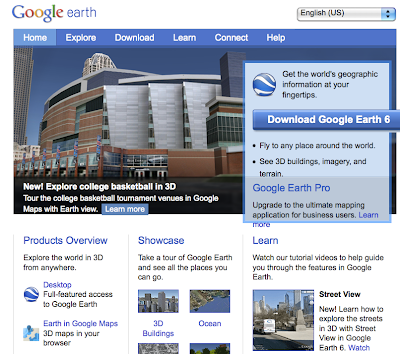
For my studio project, I have continued playing with Google Earth, and created a virtual tour of the Indiana University Campus. Google Earth really is a pretty amazing tool and the more I got into it, the more you realize how much it could do. The first thing that I did to learn about Google Earth is to go to the website and watched the tutorial videos. Some of the information I already knew, but I learned a lot of good stuff from them too.
The first thing that I did was to learn how to create and save 'markers' to your places. This is a pretty neat feature because it allows you to enter text, hyperlinks, and even save the precise view of the place you see in Google Earth. In order to not have the tour become too long for this, I chose about 6 places on the IU campus that I thought were interesting to show. From a benefit point of view, I think there could be huge benefits from the university to embrace and use this (and it looks like they have based on the number of 3-D buildings that have been created). A virtual tour could be used in recruiting prospective students, highlighting a particular part of campus, or just being used by anyone who is curious to find out more about the campus.
Once you have all of the 'markers' in your places, then I started to actually create a 'tour'. This worked ok, and I did have some setbacks. The first limitation is that while Google Earth does give some control over how the movement occurs between markers, i t can be difficult to get the settings correct and sometimes it would zoom way out, before zooming back in to the next marker. One other major problem that I encountered is that you can narrate your tour using a microphone, but it seemed to cut out after about a minute and a half. I don't know why it cut our, but I had to use QuickTime to get a good screen recording for the tour, but my actual Google Earth tour file, only has audio for the first part of the tour. The third major problem that I found is that in trying to set up and join the Google Earth community so that I could post my tour and share it with others, I was never able to sign up for a new account. I tried on several occasions using all kinds of combination, but it always gave me an error message that the user name was already taken. I was never able to set up an account to join the community. To work around this, I had to same my screencast as a movie and upload it to YouTube. The video is embedded below and in some ways this would be more beneficial as more people could view it, but having the tour inside of Google Earth allows for much greater interactivity and exploration which is important for the learning process. I could share the .kmz file (Google Earth Tour file type) directly with others and they would be able to open up the tour on their own machine, but it still has the problem of no audio.
I had to redo the video, hopefully this link and the above video will be working shortly: http://www.youtube.com/watch?v=SRFf51mVjxU
Overall I think that Google Earth is pretty fascinating. Allowing users to upload video, pictures, tours, 3-D models and other artifacts to the platform make it very interesting. Hopefully it will continue to be around for a long time and it will get the support that it needs from both Google and the users.
The first thing that I did was to learn how to create and save 'markers' to your places. This is a pretty neat feature because it allows you to enter text, hyperlinks, and even save the precise view of the place you see in Google Earth. In order to not have the tour become too long for this, I chose about 6 places on the IU campus that I thought were interesting to show. From a benefit point of view, I think there could be huge benefits from the university to embrace and use this (and it looks like they have based on the number of 3-D buildings that have been created). A virtual tour could be used in recruiting prospective students, highlighting a particular part of campus, or just being used by anyone who is curious to find out more about the campus.
Once you have all of the 'markers' in your places, then I started to actually create a 'tour'. This worked ok, and I did have some setbacks. The first limitation is that while Google Earth does give some control over how the movement occurs between markers, i
 t can be difficult to get the settings correct and sometimes it would zoom way out, before zooming back in to the next marker. One other major problem that I encountered is that you can narrate your tour using a microphone, but it seemed to cut out after about a minute and a half. I don't know why it cut our, but I had to use QuickTime to get a good screen recording for the tour, but my actual Google Earth tour file, only has audio for the first part of the tour. The third major problem that I found is that in trying to set up and join the Google Earth community so that I could post my tour and share it with others, I was never able to sign up for a new account. I tried on several occasions using all kinds of combination, but it always gave me an error message that the user name was already taken. I was never able to set up an account to join the community. To work around this, I had to same my screencast as a movie and upload it to YouTube. The video is embedded below and in some ways this would be more beneficial as more people could view it, but having the tour inside of Google Earth allows for much greater interactivity and exploration which is important for the learning process. I could share the .kmz file (Google Earth Tour file type) directly with others and they would be able to open up the tour on their own machine, but it still has the problem of no audio.
I had to redo the video, hopefully this link and the above video will be working shortly: http://www.youtube.com/watch?v=SRFf51mVjxU
Overall I think that Google Earth is pretty fascinating. Allowing users to upload video, pictures, tours, 3-D models and other artifacts to the platform make it very interesting. Hopefully it will continue to be around for a long time and it will get the support that it needs from both Google and the users.
Sunday, March 20, 2011
Little Big Planet 2 - Resources
This week I collected links to help others create levels when playing Little Big Planet 2. Like Maria’s Atmosphir, Little Big Planet 2 can be considered a game design platform, but it doubles as a game, too. Also, LBP2 provides an online community where designers can share their work. This kind of digital media is a valuable tool for those interested in creating games – it allows them to explore their creativity and gives participants a venue for self-expression.
Since I am new to this sort of digital media, I found that exploring these sites to be helpful to learn how to create levels and they were very inspirational, also. Remember, the game itself has tutorials to “play” and watch, but I do not have access to share those reels with you. In addition, these links provide cross-references to the game’s tutorials and I can share them easily with all of you.
This site is a blog created by the makers of Little Big Planet. The blog is organized well and it is easy to investigate. This blog is the first example of the many new media tools used to communicate with users of Little Big Planet 2.
http://www.mediamolecule.com/games/littlebigplanet2/
Makers of Little Big Planet also create this site and it is a compilation of tutorials and music videos about Little Big Planet. This is a second example of new media – visual and audio products to share with the LBP2 community.
http://mediamolecule.blip.tv/posts?view=archive&nsfw=dc
Flickr – This is media molecule’s Flickr site, which shares their sketches, wallpapers, digital photographs, etc. This site is a third example new media sharing and communicating details about Little Big Planet 2 – I liked this site due to the visual inspiration and the story it tells with pictures.
http://www.flickr.com/photos/mediamolecule
Media Molecule’s Facebook site connects users with the makers of LBP2. It also links users with resources to play the game and to help design levels.
http://www.facebook.com/mediamolecule
Finally, Media Molecule has a YouTube stream that users can subscribe to for recent posts of videos created by Media Molecule. This is the final example I am sharing of new media being utilized to help users learn how to design and play Little Big Planet and Little Big Planet 2.
http://www.youtube.com/mediamolecule
The wonderful connection with all of these examples is that users can also create every one of these media resources to share with their immediate community (friends and family) – for example, my daughter has created a blog about Minecraft and is currently working on video/audio recordings to post to You Tube.

She also has me post her blog postings to my Facebook page (since she is underage) – asking my friends to visit her blog. We have not started a Flickr site, but certainly could do! I am interested in learning more about bliptv.com – this is the first I have come across this web 2.0 tool. I think it is similar to youtube.com -
By exploring the resources Media Molecule has made for their game, it has inspired me to take a closer look at how we can expand our blogs and play/learn time while playing and designing games! For example, I would like to add pages to our blog so that Samantha can include more than one video game to her blog - allowing her to share a more rounded perspective of her accomplishments with this genre of media.
Since I am new to this sort of digital media, I found that exploring these sites to be helpful to learn how to create levels and they were very inspirational, also. Remember, the game itself has tutorials to “play” and watch, but I do not have access to share those reels with you. In addition, these links provide cross-references to the game’s tutorials and I can share them easily with all of you.
This site is a blog created by the makers of Little Big Planet. The blog is organized well and it is easy to investigate. This blog is the first example of the many new media tools used to communicate with users of Little Big Planet 2.
http://www.mediamolecule.com/games/littlebigplanet2/
Makers of Little Big Planet also create this site and it is a compilation of tutorials and music videos about Little Big Planet. This is a second example of new media – visual and audio products to share with the LBP2 community.
http://mediamolecule.blip.tv/posts?view=archive&nsfw=dc
Flickr – This is media molecule’s Flickr site, which shares their sketches, wallpapers, digital photographs, etc. This site is a third example new media sharing and communicating details about Little Big Planet 2 – I liked this site due to the visual inspiration and the story it tells with pictures.
http://www.flickr.com/photos/mediamolecule
Media Molecule’s Facebook site connects users with the makers of LBP2. It also links users with resources to play the game and to help design levels.
http://www.facebook.com/mediamolecule
Finally, Media Molecule has a YouTube stream that users can subscribe to for recent posts of videos created by Media Molecule. This is the final example I am sharing of new media being utilized to help users learn how to design and play Little Big Planet and Little Big Planet 2.
http://www.youtube.com/mediamolecule
The wonderful connection with all of these examples is that users can also create every one of these media resources to share with their immediate community (friends and family) – for example, my daughter has created a blog about Minecraft and is currently working on video/audio recordings to post to You Tube.

She also has me post her blog postings to my Facebook page (since she is underage) – asking my friends to visit her blog. We have not started a Flickr site, but certainly could do! I am interested in learning more about bliptv.com – this is the first I have come across this web 2.0 tool. I think it is similar to youtube.com -
By exploring the resources Media Molecule has made for their game, it has inspired me to take a closer look at how we can expand our blogs and play/learn time while playing and designing games! For example, I would like to add pages to our blog so that Samantha can include more than one video game to her blog - allowing her to share a more rounded perspective of her accomplishments with this genre of media.
Maria's design studio- Cake marathon
For my design studio this week I created a game level on www.atmosphir.com and I called it "Cake marathon". Atmosphir is a game design platform that allows users to create their own game levels and share them with the online community. I find the particular kind of media to be a wonderful tool for creative expression. Designers (users) can create whatever they want, can provide whatever experiences they like and design different difficulty features for their audiences. Creativity is for me a major characteristic of good digital media. The affordances of the particular medium fascinated me because I could manipulate everything in ways that other media had not afforded so far. For example, I could easily lay out the blocks with just one click or by dragging my cursor around the grid. I could easily add and remove objects, an action that would be difficult to obtain unless someone had advanced programming skills.

For my example, I created a level through which players must jump across several cake pieces, cookies, orange and kiwi slices, as well as a candy bridge in order to reach the final flag. It seems very easy, but when I tested it, even I had trouble getting across! I think the role of the arts and creativity is major in media for the 21st Century. It is not only colors and graphics that make digital media so much better and attractive, but also the opportunities for expression they provide. Creativity in the particular context does not mean colors and graphics, indeed. Creativity seems to be measured through the difficulty levels and the designed experiences users come up with. I find this to be a very powerful property because it comes to redefine the ways we perceive creativity in online spaces.
Screenshot from my cake marathon. Click on it to access and play the game (also at: http://www.atmosphir.com/level/show?id=420532)
For my example, I created a level through which players must jump across several cake pieces, cookies, orange and kiwi slices, as well as a candy bridge in order to reach the final flag. It seems very easy, but when I tested it, even I had trouble getting across! I think the role of the arts and creativity is major in media for the 21st Century. It is not only colors and graphics that make digital media so much better and attractive, but also the opportunities for expression they provide. Creativity in the particular context does not mean colors and graphics, indeed. Creativity seems to be measured through the difficulty levels and the designed experiences users come up with. I find this to be a very powerful property because it comes to redefine the ways we perceive creativity in online spaces.
Monday, February 28, 2011
Evan's Blog 6, concept map 3

This week's readings covered participatory media and web 2.0 media which empower users and allow them to interact with the artifacts that they consume on the Internet. My concept map is meant to start with a constructionist theory of learning at the top, which is enhanced by the modularity, manipulation, automation, and transcoding characteristics that we learned in the Lev Manovich reading. My map then slips into two of the readings from this week -- Shirky and Greenhow. The Shirky reading addresses the social theory of how the Internet has made it much easier to communicate information. I then site how Shirky refers to individual/one-to-one communication (sharing), which is the easiest form of communication; and group/many-to-many communication (cooperation and collaborative action), which are much more difficult to accomplish. At the other end of my concept map, I focus on the Greenhow readings and how she describes the process of learning. Greenhow talks more about the skills involved in the learning process (personal identification, playful learning, role playing, reflection, sharing), which relates directly to Piaget and constructionism.
In terms of been “what is ‘new media literacy’”, I'd say it is all about exploration and reflection of yourself. All of the readings (especially Greenhow and Jenkins) stress the important skills involved in learning, sharing, storytelling, creative and analytical thinking, and so much more. The more we can play and have opportunities to exhibit these skills, the better. Even more important is the ability to share your experiences with others. This way, you can get feedback and teach through learning. Likewise, as Shirky states, ‘new media literacy’ is all about being able to form complex connections with others. It is relatively easy to share information on an individual basis, but it is much more difficult to agree on an idea (cooperation), and even more difficult to carry-out a collective action (collaborative action).
However, in order to make users/students more aware of their learning process and the skills that they are using, they have to slow down and challenge them and make them more aware of their own usage of technology. If we just throw games at students, all they will do is play. As teachers (and anyone else who wants to use technology to its greatest potential), we have to guide our students/users. The more we engage students/users to become aware of and challenge their own habits, and be able to share their stories with others, the more they will learn. The environment has to be open enough where students/users can learn at their own pace, yet structured enough where teachers/superiors can give guidance and track the students'/users' progress.
In my own experiences in this class, I can easily see how easy it is to share, but how difficult it is to cooperate on an idea and then to act on it. For instance, it is easy to reflect on my own experiences via a blog or make my own comments via VoiceThread. However, it was significantly harder for me to coordinate ideas when I was a discussion leader. Likewise, it is hard to understand how someone made Scratch project just by looking at their end result and a blog post. This is complicated even more because many people post on Sunday night, so there is a lot of information overload and little time to reflect, explore, and respond. In my other class, summarizing our weekly readings on blog and then commenting with our group was a much easier activity because we still met in class to discuss things, which was more structured. In this class, everything is online and there is less structure because there is no lecture material for us to fall back on during the week. Everything is based on comments is based on class discussion and peer communication, which is fun, but I like a more structured environment.
Sunday, February 27, 2011
Maria's concept map - multiliteracies
“Defining what counts as “valid or legitimate or desirable” forms of understanding and creativity in current contexts will certainly continue to be one of the challenges.” (Buckingham, 2005, p. 149, in Greenhow, 2009, p. 249)
My additions to my concept map this week are in orange color... I found myself making even more connections and mixing this week's terms with the previous ones, which i really enjoyed! Click on the image to go to the actual concept map.

New media is about multiliteracies; it involves a (hidden) pedagogy that emphasizes on more than the ability to use language as a means of communication, but also text, music, pictures, animations, etc. It is sensitive to the cultural context one functions in and the community that speaks to particular pieces of work (e.g. when someone creates an animation about the planets, that might be speaking to the community of scientists, leisure artists, etc., depending on the character of the creation). There is a dynamic relationship between the different modes of literacies, as one can be combined with other modes. The result is a rich collection of projects and information that provide multiple perspectives, feelings and tones.
Perceiving the participants of the 21st century as being active, new media embrace diversity and freedom of speech. There are no boundaries in the way one can express themselves and there is always a means of communicating different messages. The result of the use of multiliteracies is a dynamic social change and transformation. Identities are constantly changing, being shaped and aligned with different aspects of new media. Digital immigrants, according to Prensky, are speaking the outdated language whereas digital natives seem to be talking the language of technology, of new media and can use technology naturally, as part of their lives (Prensky, 2001). In this sense, new media are a sine qua non of a person’s development in the 21st century.
I believe that new media, being so powerful, can change the ways we think about learning and professional development. Creativity in this sense becomes central in the ways that people learn and become productive in their contexts. The hierarchies that used to structure the ways people participate are no longer stable, and the power has started shifting from the heads to the participants; everyone has a voice and everyone participates in the construction of their learning. Our participatory culture, as Jenkins (2004) characterizes it, is being shaped from and shapes new media.
Shively Concept Map - Week 7

When viewing this Prezi, first, zoom out and click on "What is New Media Literacy" on the right side of the map. You will begin my concept map for this week answering the questions: "What is new media literacy?" - Each time you click on the arrow, you are being connected to the concepts I extrapolated from our readings. Towards the end I make a mini-map of major connections for the semester.
During the creation of this map, I circle back to Learning Ecology - to link it to the previous articles written by Prensky and Shirky. I felt that Prensky and Shirky were both trying to say that we need to recognize that New Media Literacy is a portion of the Learning Ecology and that it can no longer be ignored. Together, Greenhow, Prensky, and Shriky are challenging readers to take seriously the changes needed for a transformation in our nation's curriculum - asking educators to recognize the communication, collaboration, and collective groups the Internet offers (Shirky, 2008) - realize that learning environments need to be flexible spaces allowing for longer periods of exploration and creation, not mandated by high stakes testing (Greenhow, 2009) - and understand that although we are not native to this digital age, our children are and there is no turning back, thus requiring our attention and time to learn and adapt to the culture -(Prensky, 2001). I think new media literacy requires a much deeper understanding that surpasses a gap in communication - it is a new way of thinking, living, and learning.
I end with the questions we have been pondering and answering - as well as - "extras" - linking this to previous research and current research about Digital Youth and the Institute of Play. I am happy to answer questions in order to make the links stronger and/or more apparent. Thank you.
Can I make a salad out of his game?

For Week 6 I chose to dive into GameSalad, which is a software development kit for making games and applications for the iPhone, iPod Touch, Mac and Web platforms. I was introduced to GameSalad by a colleague of mine in my department, Telecommunications just to say, who’s using GameSalad in a game design project class he’s involved with. I tried applying to get into that class but was denied for some political reason or other but what intrigued me about GameSalad was its ease of use. Much like Scratch it’s based on a drag and drop interface but with a little more details when it comes to applying behaviors and rules to the actors and the scene.
The games and applications that can be made using GameSalad are immense and it does have educational uses as evidenced by this project: http://cooney-stem.skild.com/ConceptDetails.jsp?pId=5583&filterBy=filterByAll. SciTunes is in line to win a STEM award. It’s a game that was built using GameSalad that teaches children about the human anatomy using music and interactivity. The target audience for this game are students in K-2.
I was adamant on using GameSalad for future projects because of its usability and also because you can publish games, on iTunes, with it for free. You can upgrade your account, which is advised, to a pro account for a nominal fee but first time users can get away with the free package which includes access to scores of tutorials and the GameSalad Wiki.

In terms of New Media, GameSalad essentially is about computer-mediated creation. What you create using GameSalad are essentially programmes for computers, be they for the iPad, iPhone or iPod Touch. This is very much a Manovich inspired argument with a little bit of Resnick in there. If the computer is the paintbrush then GameSalad is the paint that one can use to create compelling games and applications for learning.
With GameSalad in mind I would define new media literacy as being a two-pronged category. The first is new media literacy in terms of creating computer-mediated projects. Thus one would be new media literate if they are able to create any form of game or application using GameSalad (or any other tool they choose), it’s about using the computer to make something tangible even if it is digital. The second form of new media literacy is the comprehension of games and applications made using tools such as GameSalad whereby users are literate in the sense that they can use or play the games and applications that are presented to them. It may sound simplistic or even deterministic but applied to the real world new media literacy means being able to create and use computer-mediated tools and objects.
Monday, February 21, 2011
Xtranormal video
So Evan and I are the discussion leaders for the Web 2.0 information this week and I made the following Xtranormal video as an example of Web 2.0 tools. I hope you like it and that you all have fun participating in this weeks discussion. I think that web 2.0 really is pretty fascinating stuff.
Google Earth Studio Project
 So for the past little bit, I have been playing around with Google Earth for my studio project. It really is a pretty amazing tool. I have had it loaded on my computer for a while, but haven't really looked at it too much until lately. Last week in my Computers in Education class that I am teaching, I had the students look at some different tools and the one that many of them got really excited about was Google Earth.
Sunday, February 20, 2011
Week 6 studio project - iPhone apps
The media that I explored in for my studio project is the iPhone. The iPhone is a very unique device because it has the functionality and computing power of a computer, but it is as small as a phone. What this means is that the iPhone has is more a computer than a phone-- you can play games, do email, do research, read the news, and also call people. If you are interested in learning more about the iPhone, here is a link to more information. The iPhone is also unique because it is one of the first phones to use touchscreen technology, where you touch the screen instead of pressing buttons.
Subscribe to:
Posts (Atom)